





L.T.
Student
I paste my research paper drafts into AIDetector every time—it spots AI parts fast, so I avoid misconduct and hand in fully original work.
Accurately identify content generated by ChatGPT, GPT-5, Claude & Gemini. Free, no sign-up needed.
Relied on by top organizations and trusted by innovators.












AIDetector is a free tool that spots content from models like ChatGPT, Claude, Gemini - checking text, PDFs, Word, and PPT files, then giving clear reports.

AIDetector checks your files (text, PDFs, Word) in seconds, so you don’t wait long for AI content results.
AIDetector’s reports mark AI parts clearly, explain details simply, and let you choose to share or download them—helping you use results easily.
You can click AIDetector’s built-in AI Humanizer to do one-click humanized rewriting for flagged AI content, keeping your work’s original meaning.
AIDetector lets you directly input text or upload PDFs, Word, PPT files—no need to convert files before AIDetector’s detection.
You can use AIDetector right away without signing up or sharing personal info—AIDetector is simple and convenient, saving your time.
AIDetector is totally free, and you can use AIDetector to check as many files as you want daily—no hidden restrictions.
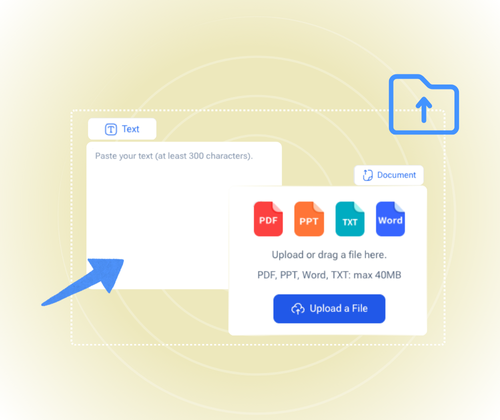
Drop your content into AIDetector by pasting it or uploading files. The AI Humanizer works with long drafts too.

Find the “Detect AI” button below AIDetector’s input area, click it to begin checking—no payment or registration needed.
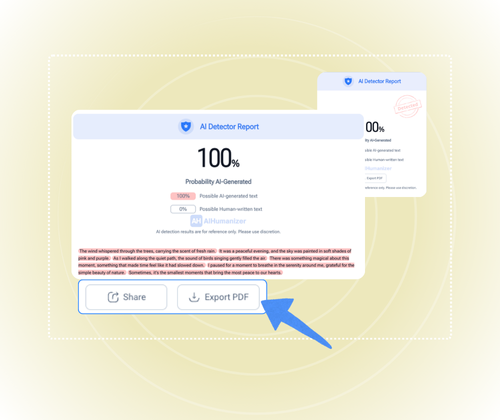
Just wait seconds for AIDetector’s results, then view AI-flagged parts or click “Download” to save AIDetector’s full report.
No registration, no cost—use AIDetector to scan text, PDFs, or Word files fast. Get clear results and keep your work original easily.
Detect AI Text NowStudents and researchers paste paper drafts into AIDetector to spot AI-generated parts, avoid academic misconduct, and ensure submissions are 100% original.
Content creators upload articles or video scripts to AIDetector; it flags AI text, helping them keep content true to their voice and maintain audience trust.
Freelancers and writers run client drafts through AIDetector to check for AI content, meet clients’ original work requirements, and boost client satisfaction.
Editors upload submissions (PDFs, Word files) to AIDetector; it scans for AI text quickly, cuts review time, and ensures published content is high-quality and human-written.
Business pros upload reports or proposals to AIDetector to find AI parts, make sure work shows their team’s real expertise, and impress clients or stakeholders.
Marketers and SEO specialists check blogs or ads with AIDetector to remove AI text, keep content engaging for readers, and improve search engine rankings.
L.T.
Student
I paste my research paper drafts into AIDetector every time—it spots AI parts fast, so I avoid misconduct and hand in fully original work.

M.K.
Content Creator
As a content creator, I upload my article drafts to AIDetector. It flags AI text, helping me keep my writing true to my voice and keep readers trusting me.

J.R.
Freelance Writer
Before sending drafts to clients, I run them through AIDetector. It checks for AI content, so I meet their original work needs and keep them happy.

S.F.
Editor
I upload submissions (PDFs, Word) to AIDetector daily. It scans for AI text quickly, cuts my review time, and ensures we publish quality human-written content.

D.W.
Business Professional
I use AIDetector to check my team's business proposals. It finds AI parts, so our work shows real expertise and makes a good impression on clients.

A.C.
SEO Specialist
I check all my marketing blogs with AIDetector to remove AI text. This keeps content engaging for readers and helps improve our search engine rankings.
AIDetector works with common text files like PDFs, Word docs and TXT files. You can upload these directly or paste text content manually to check for AI-generated content easily.
AIDetector is fast and usually gives results in a few seconds. Even for longer files, it won't take more than a minute to finish scanning.
No, you don't need to pay. All features of AIDetector, including checking files and saving reports, are available for free.
AIDetector has high accuracy. It can clearly tell apart AI text from human text most of the time, helping you trust the results.
Your content is safe with AIDetector. It doesn't store your uploaded files or text, so you don't have to worry about data leaks.
Yes, you can use AIDetector without creating an account. Just upload your file or paste text and start checking right away.
AIDetector is updated regularly. It can recognize texts from new AI tools, so it stays useful even as AI technology changes.
Yes, you can share AIDetector's reports. After getting results, you have the option to share the report with others easily.